
Keep your best model in charge.
Routemark gives Claude Code or Codex coding delegates, on a lower-cost model you choose. You stay in Claude Code or Codex, and your trusted harness keeps strategy, planning, review, and acceptance. Delegates handle the bulk of coding and unit testing.
Free under the Apache License 2.0. Open projects run on macOS, Linux, and Windows through WSL2; sandboxed projects on macOS. These are beta releases.
Make your plan go further.
Make delegation part of your everyday workflow. Keep Claude Code or Codex focused on strategy, planning, and review, while delegates on a lower-cost model handle the bulk of coding and unit testing. The aim is to leave more of your premium usage for the work that needs it.
Why we built Routemark
The ones you trust.
Claude Code with Anthropic's models. Codex with OpenAI's. To us these are the best pairings of harness and model there are right now, and the ones developers have come to trust with real work.
They run out.
Their usage is limited. Towards the end of the week the plan runs low, and the work does not.
The wrong model gets promoted.
So the high-stakes work gets finished on whatever is left. Or Claude Code or Codex gets pointed at a cheaper model through another endpoint, and that model is now the one writing your memories, creating your skills and setting your project's direction. We think that is the risky part.
Promote the right one.
You never needed your best model for everything. You needed it in charge of everything. Keep it there, and give it a delegate for the bulk of the coding.
Execution goes. Strategy stays.
Claude Code or Codex sets the direction, defines the task, and reviews and accepts the result. Delegates handle implementation and unit tests.
See who does what
- Strategy
- Planning
- Writing the task
- The review
- The acceptance
The high-value work, done by the model you trust.
- The bulk of the coding
- The unit tests
The sweat work, done by a lower-cost model in a private copy. A delegate is handed one task and a private copy of the project, never the project itself: whatever it changes comes back as one exact diff for your model to review before anything merges.
From task to reviewed code.
Claude Code or Codex
Task defined
Direction stays here.
Private copy
Implement the task
Write unit tests
Run checks
Revise from review feedback
When requestedReturns for Controller review.
Checks + review
Acceptance stays here.
Judged result
Exactly what was judged.
-
Step 01
Claude Code or Codex defines the task and what an acceptable result looks like.
-
Step 02
A delegate implements it and writes unit tests in a private copy.
-
Step 03
Checks run, and Claude Code or Codex reviews the changes against the task.
-
Step 04
Routemark merges exactly the result that was judged, after the required review.
Learn more: what Routemark is, exactly
Routemark keeps the powerful model you already pay for in charge, and lets it hand execution work to a coding agent on a lower-cost model, on your own machine. Only what was reviewed and passed is merged into your repository, unless you waive the review yourself.
- The Controller
- The model in charge: Claude Code or Codex. It writes the task and reviews the result.
- A delegate
- Another coding-agent harness, such as OpenCode, with a lower-cost model. It does the work in a private copy.
It is not a model, not a harness and not a service. It is a command-line tool and a set of skills your Controller reads, running on one machine. Without a key it calls no service of its own: your delegate's harness talks to its own provider under its own login, except that on a sandboxed project an API key you exported can be put on its calls by Routemark's proxy on your machine.
What Routemark keeps is in one directory, ~/.routemark, plus one
routemark.toml file in each project you add. Outside them it makes only
what you agree to: the skill links and, if you install the launcher, its launchd entry
and log.
See Routemark at work.
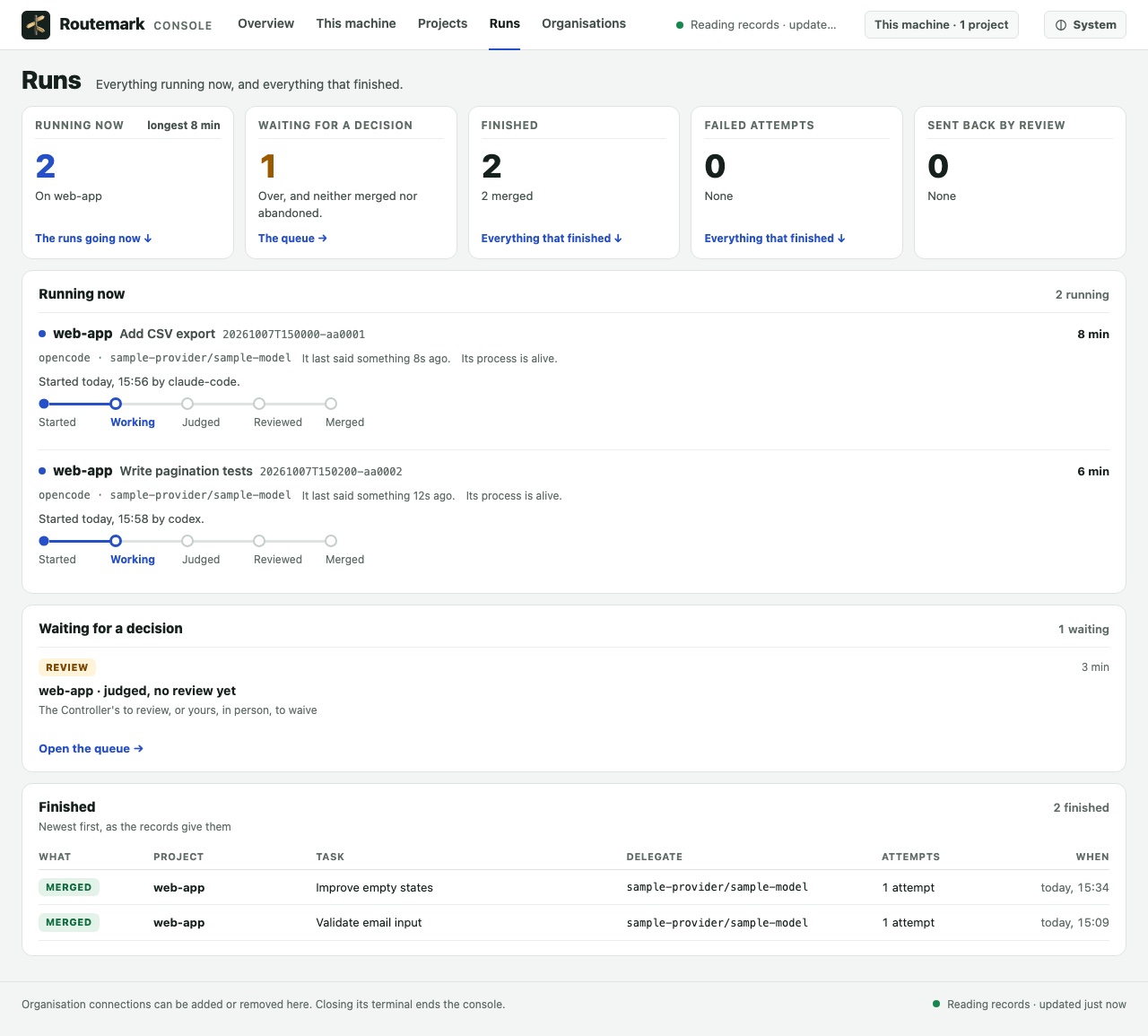
See what’s running, what needs review, and what finished—all in one local console.
-
01 / Running now
Follow the work.
See each task’s delegate, Controller, and current stage.
-
02 / Waiting for a decision
See what needs review.
Spot results awaiting the Controller’s review and see who needs to act.
-
03 / Finished
See how it ended.
Find completed runs with their recorded outcomes and attempt counts.
One task. From request to merge.
75 seconds · Real run · Console as of 0.1.0b21Watch Codex define a task, delegate the implementation, check the result, and accept the merge.
Sample project, real delegation and merge. Caption-led, with no audio. Edited with time cuts; this example is not a savings benchmark.
For developers with more to build.
Make delegation part of your everyday workflow. Give delegates substantial implementation work. The aim is to leave more of your premium usage for planning, review, and the hard problems that need your best model.
Small task? Claude Code or Codex can handle it directly.
More work. Same trusted Controller.
You never leave Claude Code or Codex.
You keep working where you work now, and ask in plain words. Your model delegates, waits, reviews and merges. Behind it the work gets done on a lower-cost model.
No second harness to learn.
A delegate harness has to be installed, with a provider it can reach: a login, or a hosted model that needs none. After that your model drives it, not you. No delegate yet? Your model offers to set one up with you, and the login is yours to do.
No account. No service unless you want one. Nothing sent to us without a key.
Routemark is a command-line tool on your machine. There is no account to make, and
without a key it sends us nothing. What it keeps is in one directory, ~/.routemark, plus one
routemark.toml file in each project you add. Outside them it makes only what
you agree to: the skill links and, if you install the launcher, its launchd entry and
log.
The model you trust has the last word.
Every result comes back to Claude Code or Codex. The checks run on one exact tree, it reads the exact diff that would merge, and nothing merges without a review on record. Whether it asks you first is agreed between you and it.
Tests the delegate never sees.
Your Controller can keep checks of its own that the delegate is never shown. On a sandboxed project it cannot reach them; on an open one they are kept out of its way. They run on the judged tree beside the project's own, so the work does not have to be judged by the delegate's own tests alone.
A delegate that is unsure asks.
Every task tells the delegate how to ask a question it cannot decide, and to wait. Your Controller sees the question and answers it while the delegate waits, about a hundred seconds. If the run ended first, the answer goes in when the task is carried on. Nobody has to guess.
Your repository is never the workbench.
The delegate works in a private copy. What merges is exactly what was judged, after a review on record.
Your numbers, not our claims.
The aim is more useful work from the premium plan you already pay for.
routemark report shows what each merged task cost your Controller, read
from its own records on your machine. Beside it stands only what was measured there
too. Where a figure cannot be read, it says so; nothing is estimated in its place.
Your models, your logins, your machine.
The delegate's model is yours to choose, from any provider your harness has. Routemark holds no opinion on vendors; if you leave the model out it starts from the last combination that worked. The harness talks to its provider under its own login, and Routemark never handles that login's credential.
Your Controller reviews. Routemark guards the merge.
Claude Code or Codex is always in charge. That is the promise, and this is what backs it. These hold because Routemark enforces them, not because a model was asked nicely.
- A delegate works in its own private copy and never writes to your real repository.
- What merges is exactly the tree that was judged.
- No credential's value is ever printed, and one the delegate brought in stops the merge.
- Nothing merges without a review on record, unless you waive the review yourself.
- Checks the Controller keeps hidden stay hidden.
On an open project, the default, these hold against mistakes and ordinary misbehaviour, not against a delegate deliberately attacking Routemark's own files; the sandbox is where they hold against that.
Learn more: each guarantee in full
- A delegate works in its own private copy and never writes to your real repository. On a sandboxed project it runs inside a macOS sandbox that lets it change only that copy and the private home and temporary folder Routemark makes beside it, and Routemark checks the sandbox holds on your machine before any work starts.
- What merges is exactly the tree that was judged. If your branch moved while the delegate worked, the judged change is applied on top of the branch as it is now, checked again, and only then merged.
- No credential's value is ever printed, and one the delegate brought in stops the merge. What could merge is scanned for credentials; a finding the delegate brought in holds the merge until you, in person, clear it with a reason. One that was already in your project is reported and does not block.
- Nothing merges without a review on record, unless you waive the review yourself. Waiving a review and clearing a credential finding work only when a person runs them at a terminal; a Controller is told to hand them to you.
- Checks the Controller keeps hidden stay hidden. The delegate never sees them.
On an open project, the default, the delegate is not sandboxed: it can see
what you can see, your files and your network alike, and
routemark project add says so. There these hold against mistakes and
ordinary misbehaviour, not
against a delegate deliberately attacking Routemark's own files; the sandbox is where
they hold against that.
Two more things about how it behaves: a merge never overwrites work you have not committed, and nothing stops a run except a person, or the budget your Controller gave it.
Failures get managed. Not merged by accident.
Routemark keeps the record. Claude Code or Codex investigates failures, guides revisions, and—with your agreement—saves useful lessons for future sessions.
How recovery and learning work
- Sent back, not thrown away. A result that fails the review goes back to the delegate with the findings, in the same session where the harness can, so it keeps what it has already read; every step of a long session sends all of that again, and Routemark says its size.
- Every attempt is kept, with the facts. The exit code, whether any work was done, the harness's own error, the full log. Routemark names no cause. Your Controller reads the facts and names it.
- Whose was it? For an attempt that failed, or one the review
sent back: the delegate's, the task as written, the environment, or Routemark
itself.
routemark reportcounts the failures and the work sent back apart. - What worked is remembered. The next delegation starts from the last combination of harness, provider and model that worked on this project, and the track record shows how each has done on your machine. It is advice. You decide.
- The lesson stays on your machine. A fix worth keeping is written by your Controller, with your yes, into a skill of its own that later sessions read. An upgrade never touches it.
- Nothing is stopped behind your back. A run that looks stuck is
reported, with the facts. Nothing stops a run except a person, or the budget your
Controller gave it.
routemark consoleshows what is running, what is waiting on you and what finished.
Routemark does not train on your work and does not change by itself. It keeps the record. The model you trust does the learning.
Get started in Claude Code or Codex.
Ask your Controller
Open Claude Code or Codex in the folder you want to use Routemark in, and paste this:
Help me install Routemark and use it in this folder. Install it with
uv tool install routemark. Run routemark skills install and
show me what it would link; link it when I say yes. Then read two of its skills,
routemark-setup and routemark: routemark home prints Routemark's folder,
and both are in skills/shipped/ under it. Follow the setup skill to set up
a delegate and add this folder as a project. Run every command yourself and tell me what
it printed. Ask me only the real choices, and ask before you install anything else.
What stays yours. Logging in to the delegate's harness, in
your own terminal. On a Mac, if your Controller offers Routemark's launcher, typing yes to
routemark launcher install yourself.
Set up by hand
-
Install it
uv tool install routemark -
Link its skills into Claude Code or Codex
routemark skills install --yes -
See what is on your machine
routemark discover -
Open Claude Code or Codex in a git project and say
Using Routemark, delegate this to OpenCode: add a short Getting started section to README.md. Review it and merge it if it is good.
No delegate on the machine yet? Your model offers to set one up with you, asks before installing anything, and has you log in to the harness yourself. On Windows, all of this happens inside WSL2: the full steps below say how.
Learn more: the full steps, for Claude Code, Codex and each delegate
-
What you need first
macOS, Linux or Windows with WSL2, git, uv (or pipx), and Claude Code or Codex, run once: running it is what creates the folder Routemark links its skills into. uv brings its own Python; pipx needs Python 3.11 or later.
-
On Windows: everything lives on the Linux side
WSL2 is a Linux machine inside Windows, with its own disk, home and programs. The project, Routemark, the delegate harness and your Controller's own process all go there. Windows holds the window you type into and the browser, nothing else.
In PowerShell, opened as Administrator:
wsl --install -d Ubuntu-24.04Restart when it says to, run the same command a second time, and it opens Ubuntu and asks for a Linux user name and password. From then on every step on this page runs in the Ubuntu window, and
cdfirst: a new Ubuntu window opens in a Windows folder. Keep the project under your Linux home, never under/mnt/c.Three ways to drive it, all from the Linux side: Claude Code's command line installed inside WSL2; the Claude desktop app with its session's environment set to WSL; or Codex's command line installed inside WSL2. There is no sandbox and no launcher there, as on Linux. The walk that proved it, step by step: docs/walkthrough-windows-wsl2.md.
-
Install Routemark
uv tool install routemarkor
pipx install routemark. -
Link its skills into your Controller
At a terminal the first command shows what it would link and asks before it links anything; run by your Controller, it links nothing. The second makes the links without asking.
routemark skills installroutemark skills install --yesThe one ordering rule: install Routemark, then
routemark skills install, and only then open your Controller. -
Open your Controller and ask
Claude Code
Open a new Claude Code session in a git project and say, for example:
Using Routemark, delegate this to OpenCode: add a short Getting started section to README.md. Review it and merge it if it is good.
Codex
Codex's own sandbox stops a delegate harness writing its state and reaching the network, so start it from the project with both opened. With OpenCode as the delegate:
codex --sandbox workspace-write -c sandbox_workspace_write.network_access=true --add-dir "$HOME/.routemark" --add-dir "$HOME/.local/share/opencode" --add-dir "$HOME/.config/opencode" --add-dir "$HOME/.cache/opencode"Then say the same thing:
Using Routemark, delegate this to OpenCode: add a short Getting started section to README.md. Review it and merge it if it is good.
Codex asks your approval before every
routemark merge, because its sandbox protects.git: approving is correct. On Linux and in WSL2 it asks before every Routemark command that writes, the firstdelegateincluded, because its Linux sandbox makes your home read-only. Approving is correct there too.The Controller runs
routemark delegate, waits for the delegate to finish, judges the result, and after its review runsroutemark merge, with your yes unless you told it to go ahead. -
Your delegate, and the model it runs
If there is no delegate on the machine yet, the Controller offers to set one up with you, asks before installing anything, and has you log in to the harness yourself.
Delegate Runs on OpenCode Open projects; sandboxed up to 1.x Prime Open and sandboxed projects Pi Open and sandboxed projects The model is yours to choose, from any provider your harness has. See what is on this machine:
routemark discoverCheck a model before relying on it. This calls the provider, so it costs one short prompt. The names here are an example: put your own in the three flags.
routemark try --harness opencode --provider kimi-code-plan-global --model k3
Here is where it stops.
The limits, said plainly, before you install.
- Windows only through WSL2. Everything lives on the Linux side. No sandbox and no launcher there.
- The sandbox is macOS only, and off by default. On an open project the delegate can see what you can see.
- Two Controllers, three delegates. Claude Code and Codex drive. OpenCode, Prime and Pi do the work.
- It is a beta. Numbered
0.1.0b, with no warranty. - No promise that it pays. It shows you your own numbers. We publish none.
- We have never seen your machine. It has been run on two Macs, on Linux and on Windows through WSL2, on real providers.
Learn more: every limit, disclaimer and unknown
What it does not do today
- Windows works through WSL2 only. Open projects run on
macOS, Linux, and Windows through WSL2, where the project, Routemark and the
harness live on the Linux side. Claude Code's command line, the Claude desktop app's
WSL setting and Codex's command line inside WSL2 are measured; a Controller on the
Windows side can drive Routemark through
wslwith an approval at every command. Its own usage is not measured. Sandboxed projects run on macOS only. - Two Controllers, three delegates. Claude Code and Codex
drive; OpenCode, Prime and Pi are the delegates. All three run on open projects;
Pi and Prime are the sandboxed harnesses, and OpenCode 2.0 runs on open projects
only until OpenCode offers a way to run without listening on a port. A delegate
paid by a subscription login runs on open projects only, except on an OpenCode
1.x, which is given its saved logins; on a sandboxed project the way is an API
key you export yourself, and for OpenRouter, Anthropic and OpenAI on Pi or
Prime, Routemark keeps that key outside the sandbox, unless you also export a
subscription's token the harness takes first, such as
ANTHROPIC_OAUTH_TOKEN: then both are inside. - Codex and a sandboxed project need one more step. Codex
reaches a sandboxed project through Routemark's launcher, which asks before it
creates anything, or by running
routemark delegateoutside Codex's own sandbox with your approval.
Know this before you rely on it
- These are beta releases. They are numbered
0.1.0b.0.1.0comes after three walk-throughs by a person. - An open project is not sandboxed. It is the default. The delegate can see what you can see, your files and your network alike.
- Your delegate's provider sees what the delegate reads. The harness talks to its own provider under your login. On a sandboxed project, an API key you exported can be put on its calls by Routemark's proxy on your machine.
- It comes with no warranty. The Apache License 2.0 says so in full.
What nobody knows yet
- Whether it pays for your work. Delegating has a cost of its own: choosing, writing the task, watching, reviewing. A task too small to beat that is better done by your Controller directly. Routemark shows you your own figures; we publish none.
- How it behaves on your machine. It has been run on two Macs, on Linux and on Windows through WSL2, on real providers. We have never seen yours.
- Other harnesses. Only OpenCode, Prime and Pi have skills. Another harness is untried.
We hit the usage wall first.
Routemark is made by Saar Inc., a small software studio incorporated in Florida. We build our own apps and AI tools, and software for clients, and we do it in Claude Code and Codex all day.
We kept running out of plan usage before we ran out of work. Routemark began as the internal framework we built to fix that on one machine. We then rebuilt it from scratch as a product for machines we have never seen.
Developer docs
How the private copy, the judged tree, the sandbox and the merge work, for people who check a claim before they trust it.